Building an AI Agent for Embedded Systems Architects
The Problem
In most embedded systems projects, access to architectural information is gated by tool knowledge. Not authority, not seniority — just the ability to remember which plugin to run, in what order, with what parameters. Senior architects navigate this fluently. Everyone else creates a queue of requests.
These tools are powerful, but their interfaces are not — you typically have to know exactly which plugin to run, what parameters to pass, where to find the output file, and how to interpret the results. The specialist handles it. The tester waits. The manager never asks.
I wanted to remove that gate. Not by replacing the tools — just by sitting a conversational AI agent in front of them.
The Idea
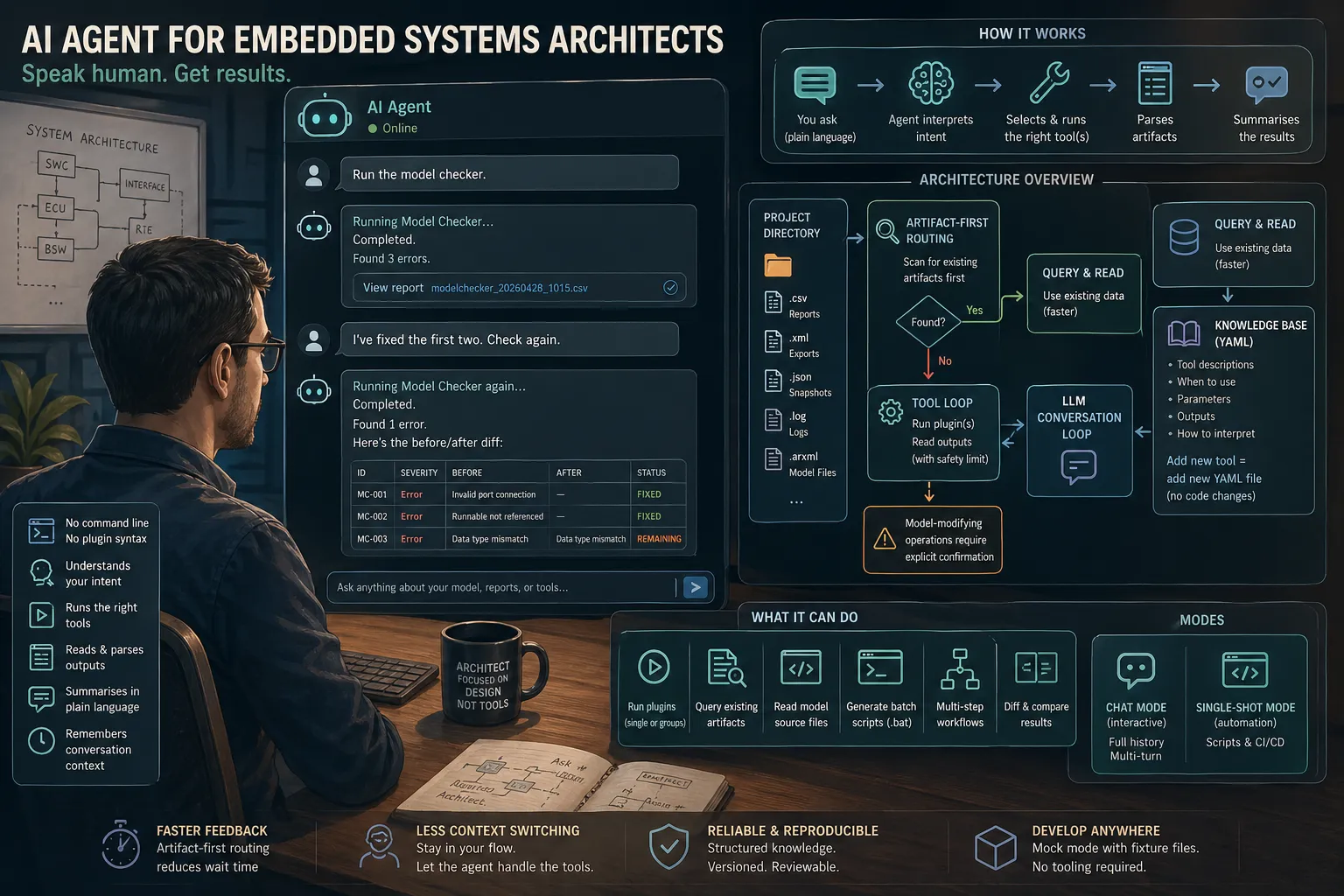
The core concept is simple: describe what you need in plain language, and the agent figures out the rest.
Internally, the agent:
- Interprets the intent of the request
- Selects the right tool or plugin for the job
- Executes it
- Parses the output artifacts (CSV reports, ARXML/XML exports, JSON snapshots, log files)
- Summarises the findings in plain text
The architect never has to touch the command line or remember plugin syntax. They just ask — the same way they would ask a colleague who happened to know all the tooling by heart.
What It Can Do
The agent operates in two modes: interactive chat (the primary interface) and single-shot (for scripting and CI/CD pipelines).
In chat mode it maintains full conversation history, which makes multi-step workflows natural:
“Run the model checker.” [runs, shows 3 errors] “I’ve fixed the first two. Check again.” [runs again, shows before/after diff]
Beyond running plugins, the agent can:
- Query existing artifacts — if a report is already on disk, it reads and queries it directly rather than re-running the expensive plugin. Answers always include the file modification date so you know how fresh the data is.
- Read model source files — search by keyword, extract structured information (ports, runnables, interfaces, requirements traceability), and automatically follow inheritance chains to show inherited elements alongside project-specific ones.
- Run plugin groups in one request — batch-execute a named set of plugins (e.g. “export all interface tables”) with a single instruction.
- Generate batch scripts — produce a
.batfile for a multi-plugin workflow so it can be run manually or by a CI job.
The Architecture
The agent is built on top of a standard LLM conversation loop, but the interesting part is what surrounds it.
Knowledge base — a set of YAML files describing every supported tool: what it does, when to use it, what outputs it produces, and how to interpret them. The LLM uses this as its “manual.” Adding a new tool means writing a new YAML file — no code changes required.
Artifact-first routing — before asking the LLM to decide anything, the agent scans the project directory for existing output files. If the data is already there, it goes straight to querying; only if nothing is found does it consider running the plugin. This keeps the feedback loop fast.
Tool loop with a safety limit — the LLM can call tools in sequence (run plugin → read output → run another plugin), but the loop is capped to prevent runaway agentic behaviour. Model-modifying operations require an explicit confirmation step.
Mock mode — on a machine without the actual tooling installed, the agent substitutes fixture files for real outputs. This means the entire system — including the conversation loop and artifact analysis — can be developed and tested without access to the production environment.
LLM abstraction layer — the agent is built with a provider-agnostic interface to the underlying language model. Swapping models requires no changes to application logic. The current deployment runs on GPT-4.1.
Observations After Building It
A few things stood out:
Structured knowledge beats unstructured prompting. The YAML knowledge base is more reliable than embedding tool descriptions directly in the system prompt. It is version-controlled, easy to review, and gives the LLM a consistent vocabulary.
Artifact-first is worth it. The biggest latency in the workflow is the external tool execution. Pre-scanning for existing artifacts and routing queries to them first made the agent noticeably more responsive in practice.
The hardest part is not the AI. Parsing heterogeneous output formats — some CSV files with non-standard separators, XML schemas that vary between plugin versions, log files with no consistent structure — required more work than the LLM integration. The AI part is almost the easy bit once the plumbing is solid.
Conversation history matters. Single-shot mode is useful for scripts, but the real value comes from the multi-turn session where the agent remembers what it just ran and can reason about it in the next turn.
Current State
The agent is packaged as a standalone executable (no runtime dependencies for end users), distributed internally, and used by a small team of architects on an active embedded systems project.
Capabilities that have been most useful in practice:
- Model consistency checking with before/after diffs
- Interface table exports and cross-referencing
- Freedom-from-interference analysis reports
- Reading and querying model source files directly without running a full export
The knowledge base currently covers a dozen plugins, with more being added as the team’s needs grow.
The most significant outcome has been access, not speed. Stakeholders who never touched the tooling directly — testers, developers, project managers — can now retrieve the artifacts they need in plain language, without routing requests through a specialist. The barrier is no longer tool knowledge; it is knowing what question to ask. For those who work with the model directly, the time to find specific information or cross-reference results has dropped by an estimated 2–3× compared to the previous workflow.
What’s Next
A few directions worth exploring:
- RAG over the model — rather than querying specific artifacts, allowing the agent to answer open-ended questions about the model by indexing its content
- Proactive analysis — having the agent flag potential issues as the architect works, rather than waiting to be asked
- Tighter IDE integration — surfacing agent responses alongside the modelling tool rather than in a separate terminal
The project demonstrated something I suspected but hadn’t tested: for tool-heavy workflows in a specialised domain, a thin AI layer that understands the tooling and speaks the user’s language can absorb a lot of friction. The tools themselves don’t need to change — just the interface to them.