The Boring Part of Requirements Review Is Now Automated
Why Requirements Review Is Not a Formality
In safety-critical software development — automotive software under ISO 26262 in particular — requirements review is a mandatory engineering step, not a box-ticking exercise. The standard requires that safety-related requirements be unambiguous, complete, consistent, and traceable to all downstream work: architecture, implementation, verification, and the safety case.
The software architect plays a central role here. Their job is not to “sign off a document” but to confirm that requirements are:
- decomposable into concrete architectural elements and modules;
- implementable within platform constraints and existing dependencies;
- traceable to software safety requirements and ASIL targets;
- free of conflicts with established architectural decisions, safety mechanisms, and interfaces.
Poor requirements are not just technical debt. In the ISO 26262 V-model they propagate into architecture defects, incomplete test cases, and weak spots in the safety case. Catching them before architecture begins is an order of magnitude cheaper than after.
Where the Bottleneck Is
The challenge is not understanding the requirements themselves — the architect knows the domain. The challenge is how much context has to be assembled before a meaningful judgment can be made.
A typical situation: a change request arrives. It references a set of requirements in a database. The architect needs to understand what exactly changed, whether the ASIL level is affected, whether there are contradictions, and whether rationale and traceability are in order.
In practice this means:
- Open the change management system, find the task, read the description.
- Determine which requirement documents or modules are affected.
- Open the requirements database, locate the relevant artefacts, export or browse them.
- Read each requirement in the context of the change task.
- Work through the review checklist: completeness, unambiguity, ASIL, traceability, implementability, architectural conflicts…
- Record findings and, where needed, draft review comments.
This is manual, context-switching work that consumes focused time on every change. And changes arrive continuously.
What the Agent Does
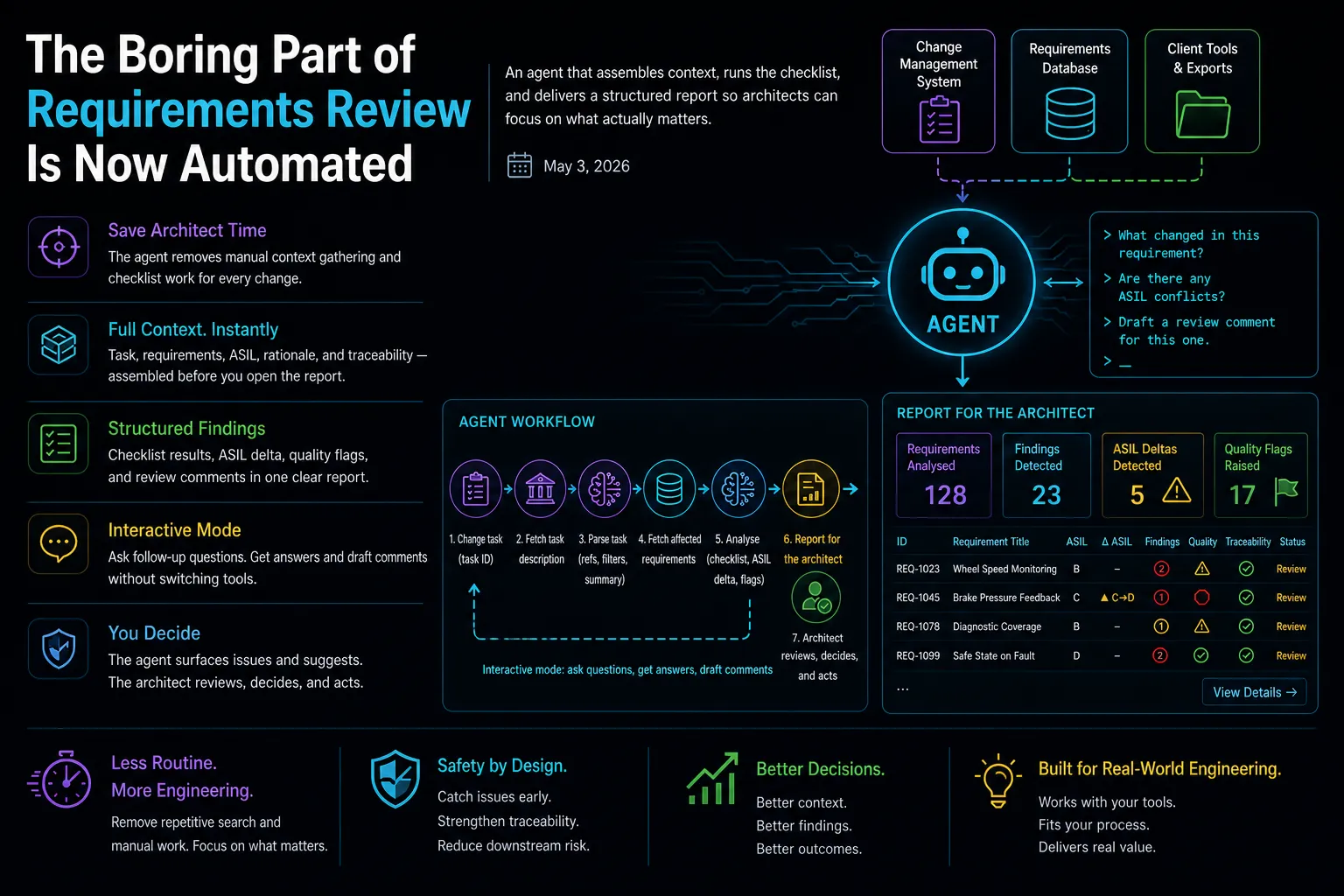
The agent eliminates the routine. The architect provides a single change task ID — the agent takes care of everything else: it reads the task, determines which requirements are affected, fetches them from the database, runs through the checklist, detects potential issues, and produces a structured report.
In interactive mode the agent effectively knows everything about the requirements for that task: the full text, field values, ASIL levels, rationale, and the context of the change. The architect can ask natural questions — “What changed in this requirement?”, “Are there any ASIL conflicts?”, “Draft a review comment for this one” — and get focused, grounded answers without switching tools or searching manually.
In practice, the context-gathering phase that typically consumes the first 20–30 minutes of a review session is done before the architect opens the report.
The final decision always rests with the architect. The agent surfaces issues, flags risks, and suggests formulations — but it does not approve or reject anything. Safety-critical judgment requires a human expert who understands the system, the project constraints, and the regulatory context. The agent is a preparation tool, not a decision-maker.
How It Works
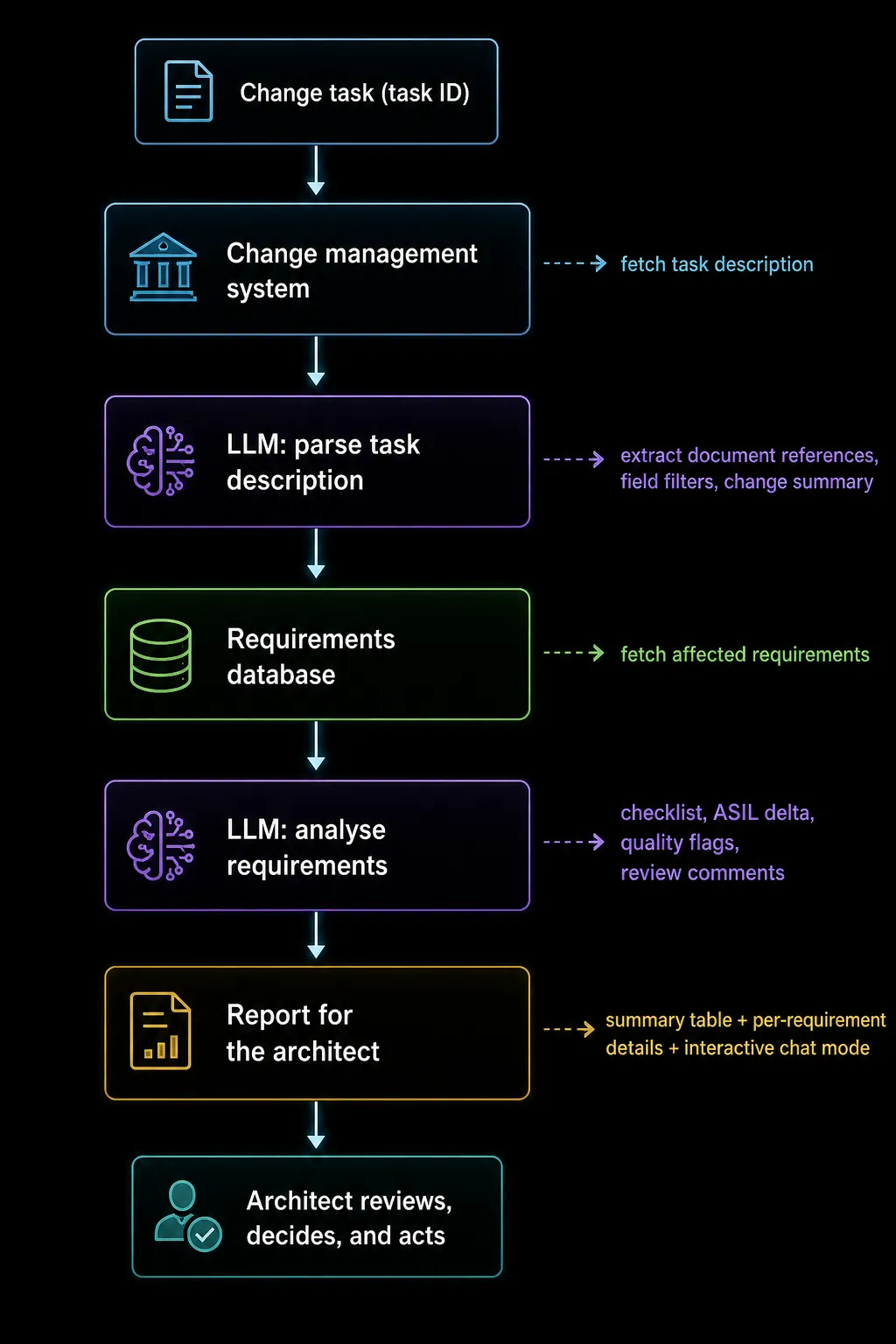
The agent runs in two modes. Batch mode — execute, get a report, make decisions. Interactive mode — a conversational interface in the same terminal session: ask follow-up questions, request a draft comment for a specific requirement, filter down to critical findings only. The agent retains full context of all fetched requirements for the task, so answers are grounded in the actual data, not general knowledge.
Either way, the heavy lifting is done before the architect’s judgment comes in.
Observations After Building It
A few things became clear during development.
Checklist quality matters more than prompt quality. The checklist is the architect’s expertise made explicit. The more precisely the checks are formulated, the more useful the report. The LLM is an amplifier here, not a substitute for judgment.
The hard part is not the AI. The most time-consuming work was integrating with real systems: understanding export formats, handling inconsistent data, correctly conveying task context across systems. The AI layer assembles faster than the plumbing around it.
Structured output beats narrative. A report table with findings per requirement is more useful than a long prose answer. The architect wants to see at a glance where the problems are and drill into details only where needed.
ASIL delta deserves special treatment. When the ASIL level shifts between related requirements, that is a signal for a dedicated check. Automatically detecting these cases and surfacing them separately in the report turned out to be one of the most immediately valuable features.
Freeing attention has compounding value. When routine search and data gathering are off the architect’s plate, they can apply their expertise where it actually matters — evaluating edge cases, spotting systemic inconsistencies, and thinking about downstream architectural implications. The agent does not make architects faster at routine work; it removes the routine so they can focus on the work that requires their expertise.
Current State
The agent runs as a command-line tool packaged as a standalone executable — no runtime dependencies for the end user. It runs on the machine where the relevant client tools are installed.
In practice, the most-used features are context assembly for a change task, the structured findings report, and ASIL delta detection. Interactive mode gets used when a finding needs deeper investigation or when a review comment needs to be drafted on the spot.
What’s Next
A few directions worth developing:
- Draft reformulations — not just a flag that “this is a problem” but a proposed corrected wording for discussion with the requirement author
- Forward traceability — verify that a requirement has upstream and downstream coverage before it proceeds to architecture
- Closer tooling integration — surfacing findings alongside the modelling tool rather than in a separate terminal
- Review history — accumulating patterns of recurring findings as a project knowledge base for future reviews
The project confirmed something that seemed intuitive but was worth testing: for workflows where the bottleneck is context-gathering across multiple systems, a thin AI layer removes most of the friction without replacing any of the tools. The interface changes. What the architect can do with their time changes. The judgment stays where it belongs.
If you work in safety-critical software development and the workflow above sounds familiar, I’m happy to discuss the approach — connect with me on LinkedIn.