Trace Links Without AI: A Few Labels per Document Did the Work
The Table Nobody Wants to Fill
Every safety-relevant automotive project has the same table somewhere. On one side, a few thousand software requirements. On the other, the architecture: a hundred or more software components, their ports, their runnables. Between them, the trace links that ISO 26262 and Automotive SPICE ask you to keep in both directions.
Someone has to fill that table, and today it is filled by hand.
The usual way to make it bearable is a linking field inside the requirement: a column in the requirements tool that holds the name of the component, and a plugin that reads it and draws the link. It works, until it does not. The field belongs to the requirements tool, but its value belongs to the architecture. When a component is renamed or split, the requirements have to be edited in a tool the architect does not own, and every renamed component turns into a ticket for someone else.
In SWCraft, the experimental architecture tool I am building, I decided to drop that field. A requirement arrives from the requirements tool as it is. The link lives only in the architecture model, which is a set of version-controlled YAML files, on the element that satisfies the requirement: satisfies: [REQ-12@3], pinned to the version of the requirement it was confirmed against. If a requirement happens to carry a component name, fine. Nothing requires it.
That decision moves the problem. Without the field, nothing tells you where a requirement goes. With several thousand requirements, you need help.
The Obvious Answer
The obvious answer in 2026 is an LLM.
The research points the same way. Trace link recovery has been studied for twenty years with information retrieval (TF-IDF, LSI, BM25), and the honest summary of that literature is that no method wins everywhere and all of them depend on the requirement and the code sharing words. The newer work, such as LiSSA at ICSE 2025, retrieves candidates with embeddings and lets an LLM judge them. Commercial requirements tools have started to advertise AI-suggested links, without publishing how or how well.
So the plan I wrote first had two parts: a deterministic part that reads evidence from the requirement and the model, and an AI part that judges the doubtful candidates.
Before building either, I wanted numbers. So I ran a light pilot beside the product, not inside it: a few throwaway scripts on real data.
The Pilot
The data came from a real automotive project: about 6 600 requirements in about 20 documents, the project’s architecture imported into SWCraft with about 90 software components, and the links the engineers had made by hand as the answer key. About 5 800 requirements link to a component that is in the model, and those are the ones scored; the rest belong mostly to basic software. Only rounded counts and percentages leave that data.
The deterministic evidence was deliberately simple, every piece readable by a person:
- The element’s name in the text. Does the requirement mention the component or one of its signals?
- Words. BM25 over each component’s names and descriptions.
- Neighbours. Where do the other requirements of the same document already go?
- Similar requirements. BM25 over the texts of requirements already linked to each component: “requirements like this one went to X”.
The metric is the one an architect feels: is the right component the first suggestion, and is it among the first five? Where some requirements are labelled by hand, only the remaining ones are scored.
Cold Start: a Third
With no link known anywhere, the right component came first 34 % of the time and was in the top five 56 % of the time.
That is not useful, and the reason is general: the requirements and the model rarely used the same words. Word matching cannot bridge a vocabulary gap, however it is weighted.
I checked the same method on two public datasets, from the open-source projects Eclipse S-CORE and EVerest, where requirements do use the model’s own names. There the first guess was right 51–80 % of the time. The lesson is not that the method is good there and bad here. It is that cold-start accuracy measures how much the requirements and the model share a vocabulary, and on a real project you should not count on it.
The Lever: Label a Little in Each Document
The neighbours changed everything.
Requirements in one document tend to go to a small set of components. Once a few requirements of a document are linked, the rest of that document has something to lean on. So I simulated the workflow an architect would actually follow: link a few requirements per document by hand, then let the search rank the rest. The simulation covers the about 5 600 scored requirements that belong to a document.
| Labelled in each document | Labels in total | Right first | Right in the top five |
|---|---|---|---|
| nothing | 0 | 34 % | 56 % |
| 5 % | about 300 | 85 % | 96 % |
| 10 % | about 600 | 88 % | 97 % |
| 20 % | about 1 100 | 90 % | 99 % |
| 40 % and more | 2 300 and more | about 90 % | 99 % |
Two things stand out. The jump comes from the first few labels, not from many: past a tenth of each document, the curve is flat. And to get the first suggestion right four times out of five, a small document needs a single label, a medium one about five, a large one about twenty.
Then a second, cheaper gain: choose what the architect labels. Instead of random requirements, label one requirement for each component the search expects in that document, then the ones where the search is least certain. At the same 5 % budget, that gave 91 % right first and 97 % in the top five, against 85 % and 96 % with random labels. Across the budgets I tried, choosing well gained 3 to 9 points at the same effort; random draws alone move these figures by up to 6, so only the larger gains are reliable.
For the whole project, that budget is about 300 decisions by the architect.
Where Is the AI?
This is the part I did not expect when I started.
After labelling, the deterministic search is right first nine times out of ten and has the right answer in the top five almost always. An LLM judge could add a few points. The cold start, where an LLM would help the most, is already repaired by about 300 decisions of the architect, and that work is not wasted: those labels are links the project needed anyway.
Against those few points stand the costs:
- Data. Requirements of a real project are confidential. Every LLM call raises the question of where the model runs, and in many companies the answer takes months.
- Repeatability. The same question can get different answers on different days. A search that reads names, words and neighbours gives the same answer every time.
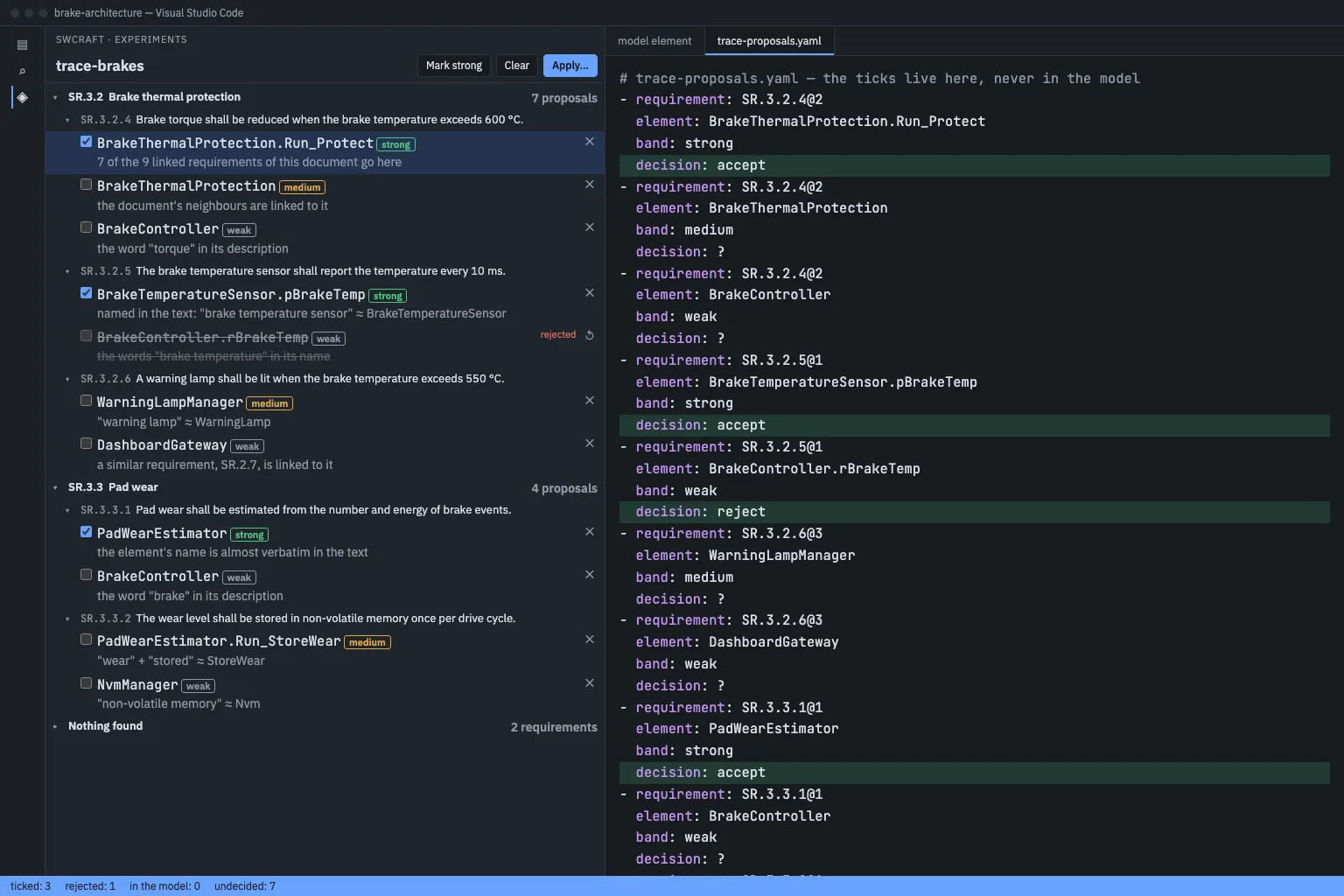
- Readability. A deterministic candidate comes with its evidence: “named in the text”, “7 of the 9 linked requirements of this document go here”. An architect checks that at a glance. A model’s verdict has to be trusted or re-derived.
So the AI part stays designed and shelved. It comes back only if a new idea for linking appears, or if using the deterministic search shows a problem it cannot solve. Requirements with no document at all are one candidate. The real project has about 200 of them, and without neighbours the text alone gets them right first about a quarter of the time.
What the Architect Sees
The design that came out of the pilot is a working cycle, not a button:
- Import the requirements. The import writes no links.
- Start the search and choose, per document, labelling or review.
- Label: for the few requirements the search picked, choose the right element, from the five candidates or from the whole model.
- Apply. Only now are links written, after a dry run and a question: write 37 links into 12 files?
- Search again, now in review mode. The labels have made it accurate.
- Review: tick, reject, apply.
There is a “mark strong” button, and it only preselects. Every link stays a decision someone made and can be held accountable for. A rejected pair is remembered and not proposed again. Apply re-checks every tick against the model as it stands, so the cycle survives being done out of order: a re-import in the middle, a renamed component, two labelling rounds in a row.
The search also does not stop at components. Ports, runnables and interfaces carry satisfies too, and the same evidence applies to them; the pilot’s answer key reaches components only, so the figures above are for components.
What This Does Not Show
- One project, one requirements tool. The public datasets confirm the direction, not the figures; their answer keys are easier by construction.
- Ranking, not reviewing. I measured where the right component ranks. I did not measure how many of the shown proposals are wrong, or how many minutes a link costs. That needs the panel and an architect with a stopwatch, and it comes next.
- Untuned weights. The combination was chosen on the same data it was measured on, from about a dozen variants per question. No held-out set was large enough to check it.
- Components only. The answer key links requirements to components, so ports, runnables and interfaces as targets are untested on real data.
The Takeaway
The question I started with was which model should judge the trace links. The pilot replaced it with a better one: where does a little human knowledge go furthest?
The answer was the neighbours. A few hundred well-placed decisions by the person who owns the architecture turn a one-in-three guess into a nine-in-ten suggestion, with every suggestion explaining itself. In this problem, AI is the step you take when that stops being enough, and so far it has not.