The Agent Did Not Need a Better Prompt. It Needed the Manual.
An agent that works on an architecture model through a tool will sooner or later be asked about the tool itself. How do I upgrade? What does validate check? What does this refusal mean?
Mine answered those questions from memory. On the weakest LLM I could pick, about one answer in eight passed. Some of the rest were plainly invented: Claude Code on Haiku told the user in one answer to install the tool with pip and in another that it installs itself automatically, and it ran a validate call the task had forbidden.
None of that was in the documentation. The agent had simply never read it.
SWCraft is an experimental AUTOSAR architecture-as-code environment I am building, introduced in the opening article of this series. The architecture model lives in version-controlled YAML; deterministic tools validate it and generate ARXML, diagrams and documentation; an LLM agent reads and changes the same model through MCP. Everything below was measured on the synthetic vehicle-control showcase that ships with it.
A word on words, as in the last post: the architecture model is the YAML. The agent is the LLM working on it.
Why didn’t it just read the documentation?
That is the first reaction, and a fair one. Agents read files all day. The guide exists. Let the agent read what it needs.
In SWCraft it cannot, and that is deliberate.
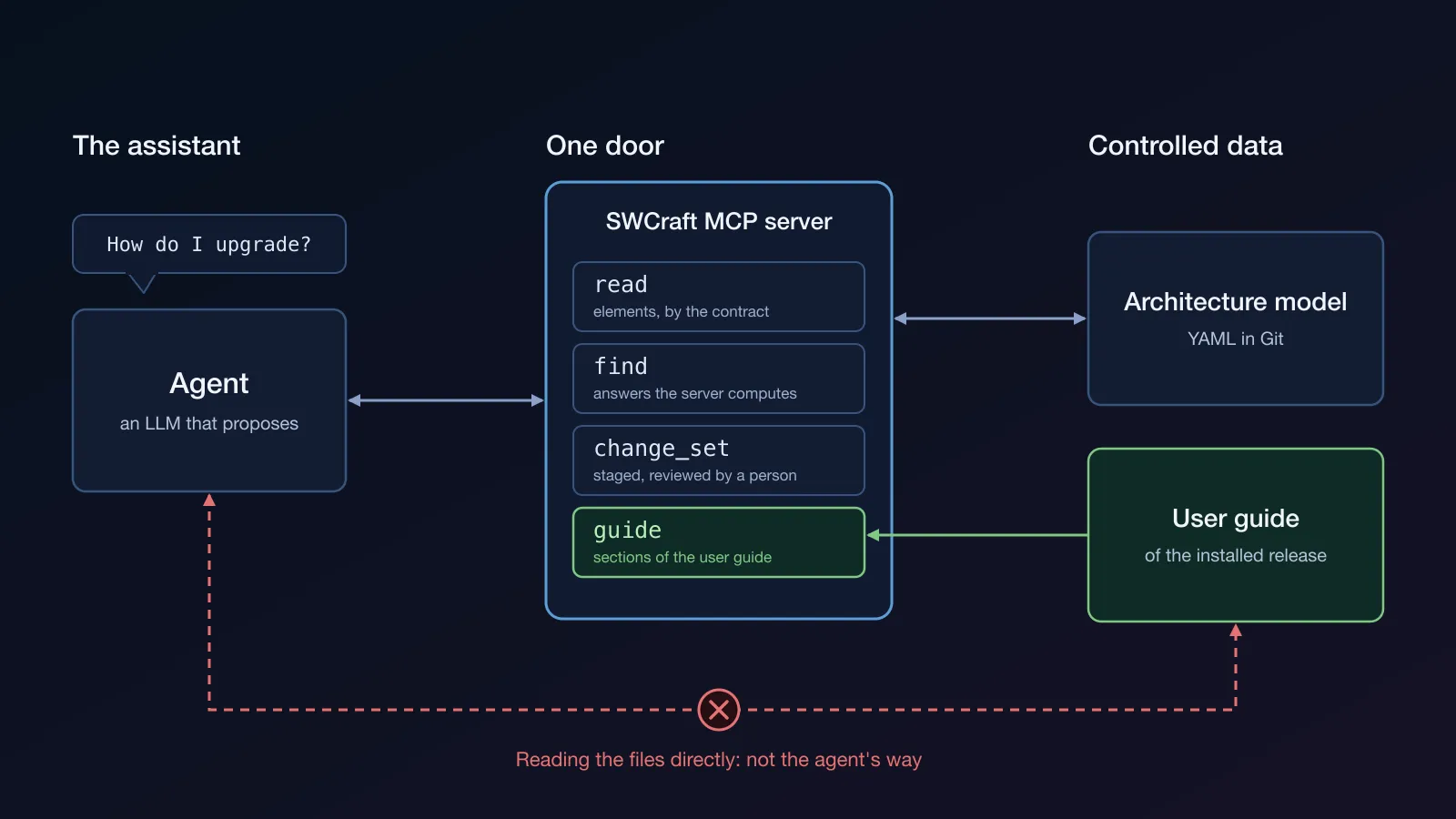
The agent has one door: the MCP server. The agent profile SWCraft ships grants it the SWCraft server’s tools and no file editing or terminal. The one exception is a read-only file tool, for a single purpose: reading a long SWCraft answer that the editor saved to a file. The profile forbids using it on the model or any other project file, and a hook in the project refuses any file read of the model. The agent never opens the model’s YAML. It reads the architecture model through read and find, and it changes it only through change_set, which applies the change to a shadow copy, validates it and shows the exact delta to a person before anything is committed, as described in the post about the tool count.
The reason is the principle SWCraft is built around, set out in the opening article: the agent is an assistant. It may explore, propose, analyze and recommend, but turning a proposal into the accepted architecture is a person’s decision. Every change it proposes is a change set that a person approves.
Keeping the agent from writing the files would be easy; a hook can do that. Reading is the harder half. The agent should know and work with data that is clearly defined and controlled: elements addressed through the model’s contract, which discover describes, and answers the server computes and bounds, not whatever a YAML file happens to hold and the LLM’s own reading of it. So the boundary is the server, for reading as much as for writing. A hook enforces this for the model; for other files, the agent’s instructions do. When it needs something the server cannot give, its profile tells it to ask the user, not to work around the boundary.
The guide was on the other side of that door. The user guide ships with the installed release, as a rendered HTML site inside the package. It is not in the user’s project, and not on the public web either. It also has to be the guide of that release: a web page or the LLM’s memory may describe another version. And nothing in the profile or the project’s instructions mentioned that a guide existed.
So the agent knew the architecture model through MCP, and the tool around it only from its profile. Asked how to upgrade, with no source in reach, an LLM does not say “I don’t know”. It answers with what tools of this kind usually do, and installing with pip is what many tools do. SWCraft does not.
The fix had to come through the same door, and in small pieces. Giving the agent file access to fix this would have undone the boundary. The guide had to become one more thing the server answers. It also had to answer in parts: the largest sections run from 42 to 57 KB, and Copilot in the editor saves any tool answer over 8 KB to a file, which the agent then reads again, piece by piece. The last post was about exactly that kind of reading to see.
The idea
It fits in one sentence: give the agent the same documentation we show the user. Then scenarios and how-tos can live there instead of in the agent’s prompt, the agent makes fewer requests, and it stops guessing.
So the server got one new MCP tool, guide. It does three things: search, show the table of contents, read a section. It reads the user guide of the installed release, the same text a person reads, shipped with the tool. There is no network call and no embedding model.
The search is lexical, on purpose. Embeddings would have meant a second service, with its own key and its own corporate access, and a ranking that depends on that outside model, which my tests could not pin down. The network was not the reason: the agent’s LLM is remote anyway.
The how-to pages are written once, for both readers, in one fixed shape. A person reads them in the guide; the agent reads the same page through guide.
That let the agent profile get shorter. Twelve recipes moved out of it into the guide, about 680 words less in every profile. What stayed is an index of the how-to pages and three rules:
- A question about the tool itself is answered from the guide: call
guidefirst, never answer from memory. - Name commands, flags, variables and files exactly as the section writes them.
- End the answer with a link to the section that was read. In the editor, it opens the guide in a tab.
The cost on the wire was small. The tool list the client loads grew by about 3 %. The server’s discovery summary did not grow at all.
How to check an answer without an LLM judge
An answer to “how do I upgrade?” is prose. Checking prose by hand does not scale, and checking it with another LLM puts a second unverified judgement on top of the first. I wanted a checker that gives the same verdict every time.
An answer counts as correct when three things hold:
- the agent read one of the expected sections, which the MCP call log shows;
- the answer contains the exact identifiers an operator needs, for example
toolchain_version, a variable name or a flag; - it contains none of a list of known-wrong statements.
The link at the end is scored separately, as form. A correct answer without a link is a correct answer with a form defect, not a failure.
The criteria are written before any reply is seen. Afterwards they may only become stricter, or change when a strong LLM shows that a criterion itself is wrong. Every change is recorded.
There were two kinds of tasks:
- 8 questions about the tool, such as “what does a stale-baseline refusal mean”, “how do I upgrade”, “what does
validatecheck”; - 24 architecture model tasks, such as “add a port” or “which components run on this core”, checked by fact: the architecture model changed as required, or the answer names the required elements and none of the forbidden ones. These ran with and without the guide, to see whether it got in the way.
Three hosts: Codex and Claude Code for debugging, because they are cheap to run, and GitHub Copilot to confirm, because it has a monthly credit budget. On all three the agent had the same door: the SWCraft tools, no file editing and no terminal. Codex ran in a read-only sandbox with every other tool turned off, Claude Code with no built-in tools at all, and Copilot with its profile, the read-only tool for saved answers included.
The LLMs were the weakest available, on purpose: gpt-6-luna on Copilot and on Codex, Claude Haiku on Claude Code. Each question ran 5 times.
The strong-model rule
A weak LLM misses things. The hard part is telling a miss that is the LLM’s from a miss that is mine: a vague section, a misleading help line, a broken checker.
So a strong LLM (gpt-6.1-sol, Claude Sonnet) runs as a control, with one rule:
- if the strong LLM passes a task the weak one misses, the miss is most likely model capability;
- if the strong LLM misses it too, the error is most likely ours.
It is a triage rule, not a proof. It sorts each miss before I look at it, instead of my preference deciding, and “use a stronger model” becomes an honest answer only for the first kind. A miss of the first kind can still point at the documentation; one below did.
The numbers
Without the guide, questions about the tool: about 1 correct of 8, on every host. That figure is not on the same scale as the table below. The baseline was scored by an earlier checker, before the criteria above existed, and was not re-scored: the final checker requires a guide section to have been read, so a build without the guide fails it by construction. The two are a before and an after, not a controlled comparison.
With the guide, final build, weak LLMs, 8 questions × 5 runs:
| Host | Correct, of 40 | Valid section link, of 40 |
|---|---|---|
| Copilot (gpt-6-luna) | 39 | 40 |
| Codex (gpt-6-luna) | 39 | 39 |
| Claude Code (Haiku) | 40 | 38 |
Known-wrong statements with the guide: zero.
A valid section link means a link to one of the sections the question expects, not just any link.
The strong-model control ran on an earlier build, not the final one. On that build, correct of 40, weak against strong: Codex 37 against 40, Claude 39 against 40. Every miss the weak LLM made there was a task the strong one passed five times out of five, so by the rule they were capability first. One of them also exposed a gap in the documentation, the validate help line described below, and it was fixed. One documentation gap is still open: the guide’s reference section on the validate tool does not name --warnings-as-errors, the flag that makes warnings fail swcraft validate.
The 24 architecture model tasks, run once each, showed no loss. On the final build Copilot passed 24 of 24, Claude 24 of 24, Codex 22 of 24. Codex passed the same 22 without the guide; its two misses are the weak LLM’s, on both builds.
Search quality was measured on 40 questions written by a different LLM that had never seen the guide. The right section in the top three went from 17 to 23 after comparing rankers, which is one of the stories below.
What went wrong on the way
The table is the end of the road. Most of what I learned came from the wrong turns.
Single runs lie
On three nearly identical builds, Copilot scored 7 of 8, then 8 of 8, then 5 of 8. After a long series of changes the score was back at five of eight, and it looked as if none of them had helped.
The builds had barely changed; the score had. One run per question cannot tell noise from change. Only repeated runs, five per question, separated the two. The last post ended on the same lesson: one run is an observation, not a rate. I had to learn it again.
”Just use BM25” was an assumption
Lexical search meant BM25. Everybody knows that, so nobody tested it. When three rankers were finally compared on the independent question set (simple field weights, BM25 and BM25F), plain BM25 lost.
The real defect was not the ranker. One section of 48 KB matched almost every query and crowded the results. Scoring long sections by their parts, and counting only the heading, the purpose line and the keywords as matched words, fixed it.
Every line of the profile has to be measured
Moving the recipes out of the profile removed the one example the weak LLM had been copying. “Which components use this interface” broke on two hosts. One teaching example went back in.
Then one added sentence in the profile cut Claude’s links from 22 of 24 to 10 of 24. It did nothing wrong in itself: it pushed “end with a link” out of the last position in its paragraph. Moving the rule back restored the links.
A prompt is not documentation the agent reads once. Position matters, and every line is a change to measure.
The checker had bugs too
The first checker matched paraphrased facts by keyword lists, and the lists kept being widened after replies had been seen. That is a checker learning to agree with the agent. It was replaced by exact identifiers, forbidden statements and the call log. An LLM judge was proposed and rejected: too complex, and not deterministic.
At first the link was scored as part of correctness, so correct answers without a link counted as failures. Splitting correct from form changed the picture. On one build Claude had 21 correct answers of 24, not 10.
One task failed on all four LLMs, the strong ones included. By the rule, that was our error, and it was: the checker did not expand “SWR-DIA-001 to SWR-DIA-010” into the ten identifiers. The strong-model rule found a bug in the instrument, not in the agent.
The benchmark found gaps in the documentation
Neither swcraft validate --help nor the MCP validate tool’s description said that the ARXML is checked against the AUTOSAR schema. Fixing the help line took Copilot on that question from 2 of 5 to 5 of 5.
That was the best result of the whole exercise. The agent reads what a user reads, so a gap the agent trips over is a gap the user would trip over too.
The hosts have their own behaviour
Copilot’s service answered some runs with a different LLM than the one requested, without saying so. The runner now flags it.
Codex cancels the MCP approval prompt in headless runs, so its change tasks could not be scored up to the commit. The runner now approves through the same channel the editor’s review tab uses, which the agent cannot see.
What this does not show
The checker does not judge how well an answer paraphrases the guide; it checks identifiers, forbidden statements and that a section was read. The runs were headless, not in real editor clients. And the showcase is small: a large project was not part of this.
The rule I would keep
Questions about the tool are not questions about the architecture model, and the agent’s memory is the wrong place to answer them. The user guide is the right place, and the agent should read the same one the user reads.
Doing that is cheap: one tool, a search with no embeddings, a profile that got shorter. Proving it worked took most of the effort: repeated runs, criteria fixed in advance, a checker that never asks an LLM, and a strong LLM as a control that sorts the misses into the model’s and mine.
The agent stopped inventing. And because it finally read the documentation, it showed me where the documentation was wrong.